Playbook
Tutor Text Messaging
Text messaging for tutoring businesses helps tutors stay connected with families, schedule sessions more frequently, and generate more student enrollments—all from one channel.
In this tutoring playbook, you’ll learn how tutoring centers like yours can use SMS businesses texting to:
Attract new students
Improve communication with parents
Streamline scheduling and reminders
Generate more online reviews
Save time for tutors and admins
Note: This playbook can apply to tutoring centers of all sizes and with multiple locations, but we do have ones with 10 to 20 employees in mind.

10 Ways to Boost Your Tutoring Business with SMS
1. Add SMS Chat to your tutoring website to capture more leads.
Parents are eager to get help for their child ASAP. SMS Chat gives them a way to reach you the moment they find your website.
It’s a widget parents can use to text you directly from your homepage. Any replies go to their phone, and you get to keep their number for follow ups.
An SMS Chat widget allows parents to:
Start a conversation in seconds
Ask questions about programs or availability
Connect with your team without filling out a form
The faster you respond, the more likely families are to choose your tutoring center over a competitor.

2. Use templates to streamline onboarding and scheduling processes.
Templates, or the Text Request version of saved messages, help tutoring centers respond faster and stay consistent across every interaction. Text message templates give you a way to streamline common communications that you send every day, like:
Session scheduling and reminders
Program descriptions and pricing
Daily assignment or homework reminders
FAQs from parents
Start by compiling a list of the most common questions your tutors get asked, and then save your responses as templates. Having the same response every time will also help with consistency and keeping tutors and admins on the same page.

3. Recruit new tutors and staff sessions using faster mass texts.
Hiring qualified tutors is competitive, and timing matters. Mass texting, sometimes also called bulk messaging, helps your tutoring center instantly reach all applicants at once instead of emailing and waiting for replies.
Upload your spreadsheet of applicants into Text Request, and text them throughout the hiring process. Just drop the CSV file into a mass text, and message all your applicants at once for things like:
Confirming you received their application
Answering follow-up questions
Scheduling interviews and follow-up interviews
Next steps, including paperwork
Mass texts can also be used to reach your existing tutors whenever you need to fill an open session quickly. Staffing and hiring is always much smoother and faster when you can reach everyone at once with a single text—it certainly beats calling everyone individually!
4. Use SMS keywords to promote programs and offers.
SMS keywords make it easy to attract new students and keep current ones engaged.
A keyword is a term parents can text your tutoring center to be opted-in for promotions or educational information, like:
SAT/ACT prep sessions
New tutoring programs
Seasonal offers and discounts
Study tips and resources
study sessions specifically for upcoming SATs or new reading programs. Showcase your keyword in public places like your website, social media, and digital ads with an announcement, like:
“Text LEARN to [business number] for exclusive discounts and learning materials!”
Parents who text the keyword are then added to a group that you can then message again and again to keep them hooked on your services and offers. We have a guide dedicated to how you can continue to engage and grow your keyword subscriber list ongoing.
5. Use text-to-pay to simplify payments for your tutoring center.
Text-to-pay makes it easy for parents to receive, view, and pay invoices directly from their phones.
It's easy for clients to get caught up in their own things and forget to pay after tutoring sessions. But chasing down payments after tutoring sessions slows everything down, for you and your tutors.
Instead of relying on emails that get missed, send a quick SMS payment reminder that parents are more likely to see.
SMS payments helps tutoring centers like yours do things like:
Send invoices instantly
Remind parents to pay
Track transactions in one place
The result? Faster payments, fewer follow-ups, and more consistent cash flow.
69% of people want to receive texts for payment reminders, because they actually see them. Text Request's SMS Payments feature makes it easy to share invoices securely and track transactions all in one place.
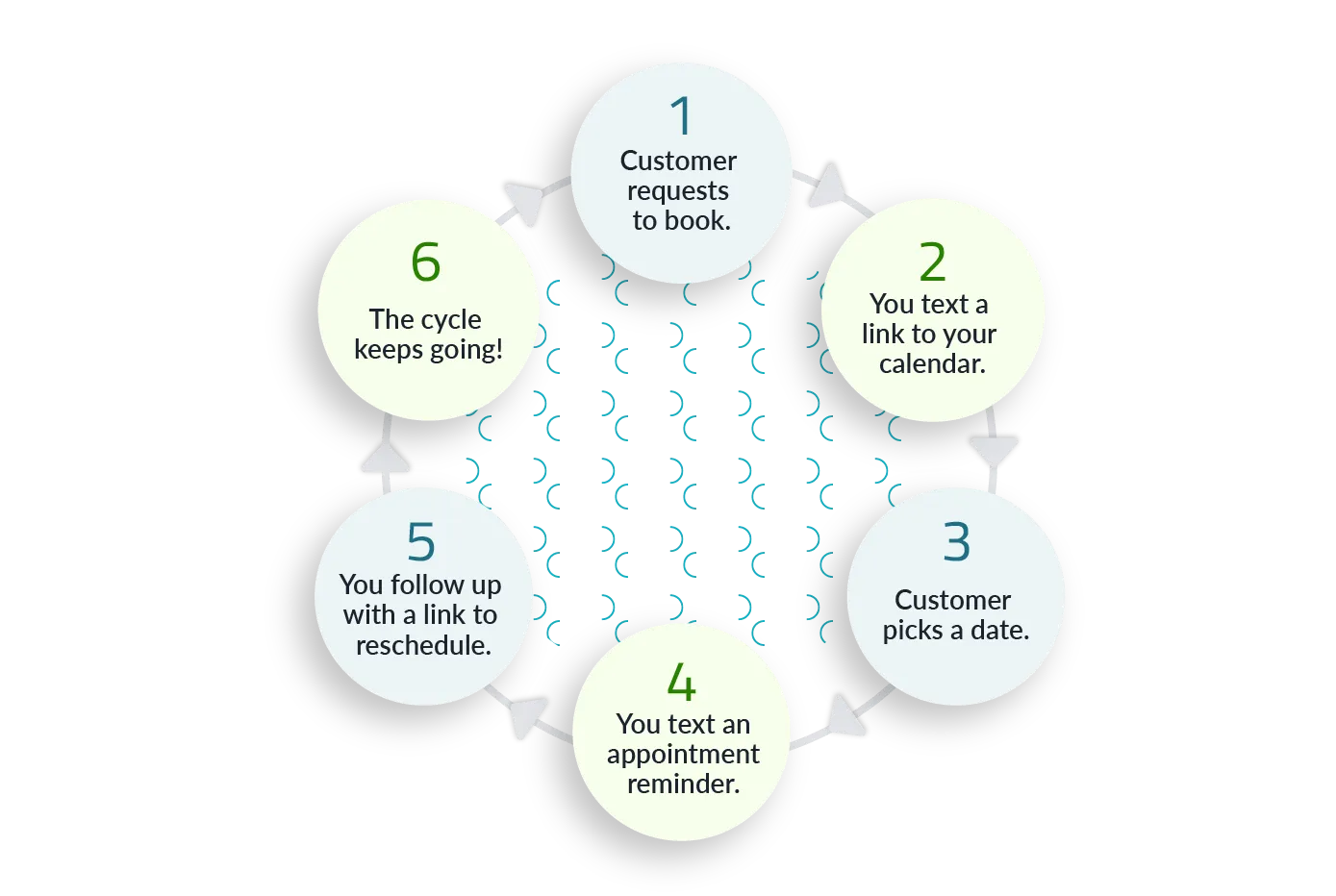
6. Reduce no-shows with automated text message session reminders.
SMS reminders help families make sure they don’t miss tutoring sessions.
Schedule reminders in advance so parents and students can confirm their attendance with a simple reply. This helps you create more time to focus on other tasks.
A solid text reminder will directly ask the student or their parents to confirm they’re coming to their session, like:
“This is a reminder that your tutoring session with [Tutor Name] is at [time] on [date]. Text YES to confirm you're coming.”
Automated reminders help you:
Reduce missed tutoring sessions
Keep schedules full
Improve overall client experience
You’ll cut out on missed sessions, keep revenue consistently coming in, and save on a ton of sanity.
7. Increase your tutoring center’s online reputation with Review Management.
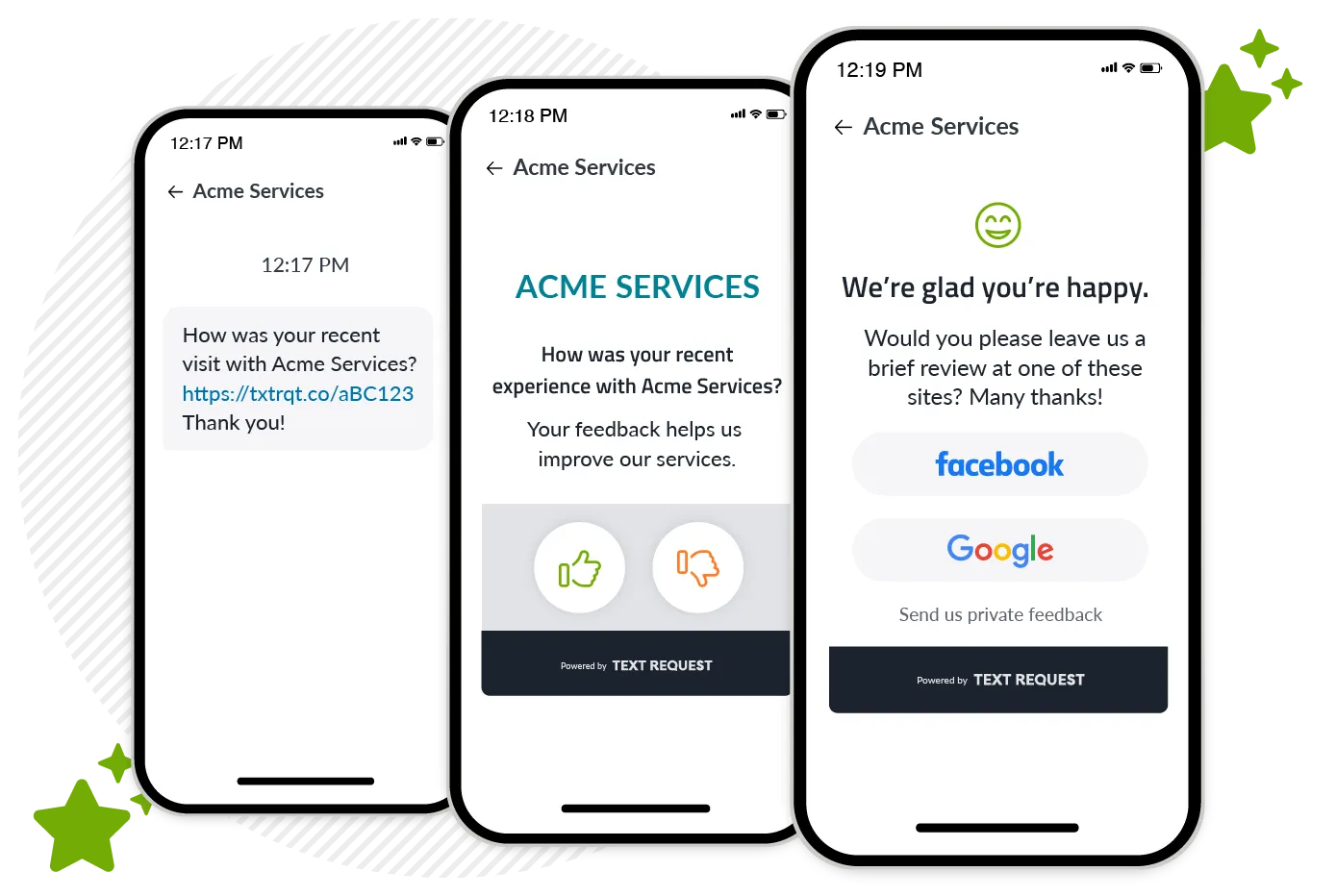
Text messaging makes it easy to ask for reviews at the right moment, whether that’s right after a tutoring session or a major milestone.
You won’t show up in search results for “best tutors near me” without Google reviews. It’s that simple. Gathering reviews ongoing is a must to draw in new parents.
Here’s how your tutoring center can implement Text Request’s review management feature:
Connect your Google Business page to Text Request
Insert custom reviews links into your texts asking parents for feedback
Monitor and respond to oncoming reviews from inside Text Request
SMS review requests help you:
Increase your number of positive online reviews
Improve local SEO rankings
Build trust with prospective families
There's a direct line between earning online reviews and improving your Google search results, which brings in new students. Text messaging is the fastest way to reach parents for those reviews, and Text Request gives you one place to manage them.
8. Improve communication and learning with Multimedia Messaging Service (MMS).
MMS (picture and file messaging) lets you send images, PDFs, and other helpful resources directly to parents and students—helping you communicate more clearly and move faster.
It’s frustrating when you need a family to approve or sign something before you can move on to scheduling a tutoring session. Likewise, it can be a struggle to answer some questions without visual aids.
Use MMS for things like:
Contact or enrollment forms
Teaching materials and visual aids
Referral forms
Practice assignments and homework
Getting these files and resources in front of clients faster means less bottlenecks, more sessions scheduled, and an increase in client satisfaction.
9. Use merge fields to personalize text messages and learning experiences.
Personalized text messages stand out and get better responses. So how does Text Request make it easy for you to personalize your messages? Our merge fields feature allows you to automatically insert details like a student’s name, session time, or program into your text, so every message feels tailored without extra effort.
Using merge fields in your text messages makes it easy to:
Refer to a student directly by name
Reference previously established pain points and learning goals
Mention upcoming sessions or past activity
Call out previously scheduled sessions or programs in relation to upsells
The key is to consistently document personal details about students that you can then easily refer back to. Merge Fields help you do exactly that, so you can increase engagement and client satisfaction through text messaging.

10. Manage all tutor conversations in one place with business texting software.
Business texting ensures every message between tutors, parents, and students live in one place. That way, you can ditch your personal phone—so nothing gets lost, missed, or sent from the wrong number. Tutors can even access the platform on the go using our Text Request mobile app, without having to be at a desktop.
Set account permissions based on roles in your tutoring center, and give each team member the right level of access based on their responsibilities.
Administrator: Have access to everything and can control changes to what your account is charged. Best for the owners at your tutoring center.
Manager: Can access everything that doesn’t involve charges to your account. Best for more senior level tutors, like managers or team leads.
Customer Service Rep (CSR): Can only send and receive messages. They cannot change settings, edit contacts, or make changes to what your account is charged. Best for junior-level tutors.
Every tutor will be able to text at a level that best fits their expertise.
Start Using Text Messaging at Your Tutoring Center Today
You already advertise your tutoring center’s business phone number everywhere. Making it textable saves you the hassle of updating all your current marketing collateral with a new number, plus gives families the power to reach you the way they prefer.
Text Request enables your tutoring center to:
Turn your existing number into a business texting line
Manage all conversations in one, secure place
Automate reminders, follow-ups, and review requests
Support your tutors with tools built for real workflows
Text Request also provides ongoing training and support for your tutors who use it to text message. Our team of experts is here to help you get started and provide the best text messaging experience possible for your students and families.